1. How do I make search easier to find on mobile?
Provide a prominent search box on mobile devices. Spotting the search icon isn’t always obvious on phones, so we recommend replacing it with a full-width search bar. Making the search area more prominent ensures your customers are more likely to use it rather than overlooking it.


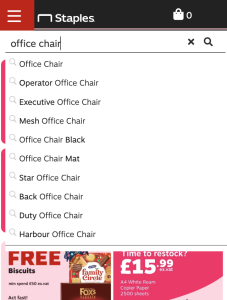
2. Should I offer query suggestions or product matches?
Offer query suggestions instead of simple product matches. When you have a huge range of items, it’s unlikely a specific product suggestion will be exactly what a customer needs. Your search needs to make intelligent keyword suggestions to point them in the right direction.
3. How do I handle synonyms in search?
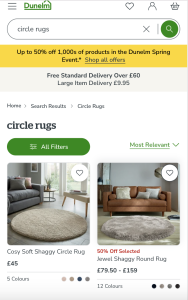
Ensure your search handles synonyms effectively so users can find what they need. Many brands name products differently than the way customers actually talk. Use synonym mapping to ensure terms like ‘hairdryer’ and ‘blowdryer’ or ‘round rugs’ and ‘circle rugs’ return the same results.
4. What are stopwords and lemmatization?
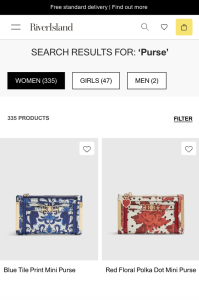
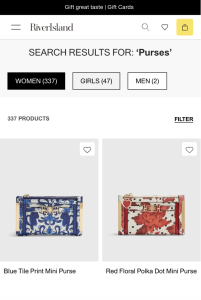
Use a search tool that supports common words (stopwords) and identifies base word forms (lemmatization). For example, ‘dress’ and ‘dresses’ should return the same results. Your search should also be smart enough to know that ‘run’ and ‘running’ are the same thing.
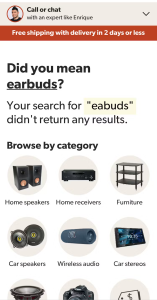
5. What should I do when a search returns zero results?
Offer helpful next steps instead of a dead-end “zero results” page. When a search fails due to a typo or a product you don’t stock, provide:
- A ‘did you mean’ override.
- Links to popular categories.
- Links to Live Chat or Contact pages.



6. Should my search show more than just products?
Include help information and policies in your search results. Users often search for details on returns or buying guides to help them decide on a purchase. Showing these results directly means they can find exactly what they need without extra effort.
7. How do I promote popular search terms?
Use your analytics to find popular queries that already convert well and promote these before a user even starts typing. If your products are seasonal, review and update these promoted terms every month or quarter.

8. How does AI improve site search?
Provide clean data to your AI search tools to get the best results. Modern AI can bridge the gap between products, content, and natural language to improve the user experience quickly. However, the output is only as good as the underlying data you feed it.